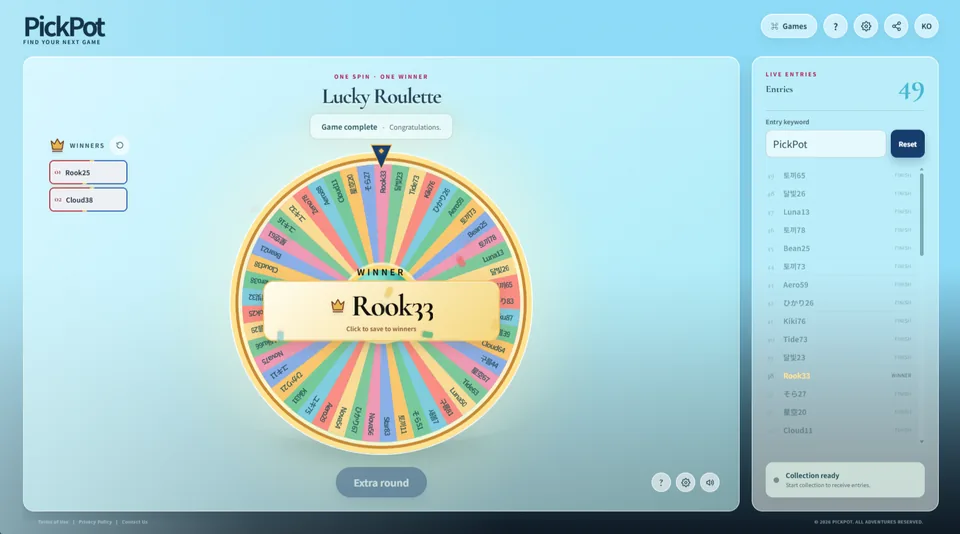
Lucky Roulette collects viewers from live chat and selects one winner at random. Alongside a simple draw, it supports winner history, extra rounds, and special presentations such as Final Two and Chaos Round.
Make the wait part of the fun
An instant name reveal can end a giveaway in seconds. Once the wheel starts, every entrant has a reason to watch. As the pointer crosses names and the wheel slows, anticipation builds in chat and the final step becomes a small climax for the stream.
Lucky Roulette works for giveaways, community events, team selection, or choosing a featured viewer. Hosts focus on collection and the reveal while viewers join through familiar chat, making it useful for both a quick segment and a larger event.
Lucky Roulette result screen
Collect participants
First check the streaming platform and chat bridge connection in Settings. Announce the entry keyword and start collection. Viewers whose messages contain the keyword appear in the participant list; duplicate or ineligible messages follow the current collection settings.
Before drawing, review the participant count and list to catch an incorrect keyword or connection issue early.
Finish collecting entries and press Start Roulette.
Press Stop while it spins; the wheel slows down and chooses a winner.
Confirm the name on the result screen to add it to winner history.
Continue with an extra round or reset participants for a new draw, depending on the settings.
Winner history and duplicate winners
Confirming a result adds that person to a separate winner history. The history remains when participants and the wheel are reset, so you can continue through multiple prizes or draws. Use the history reset control only when you want to begin a fresh winner record.
If a previously recorded participant is selected again, a reroll presentation may appear. Follow the on-screen prompt and confirm the active candidate before saving the result.
Special rounds and game settings
The hidden-effect chance can replace a standard result with a special presentation such as a Final Two battle or Chaos Round. Final Two presents the last two candidates, while Chaos Round narrows the remaining candidates through a slot sequence.
Auto-start: begins spinning when entry collection ends.
Auto-stop: begins slowing the wheel after the configured start sequence.
Scratch reveal: covers the result until the coating is scratched away.
Mute background music: silences only the roulette bed while keeping spin and result effects.
Presentation tips for your stream
For a casual event, a short keyword announcement and one quick spin may be all you need. For an important prize or celebration stream, review the entry count, restate the prize and conditions before the spin, and let anticipation build. Scratch reveals and special rounds feel strongest when saved for a featured draw rather than used every time.
When selecting several winners, winner history becomes a visible running record. It keeps previous selections easy to review while the host moves to the next prize, helping viewers follow the event without interrupting the pace of the stream.