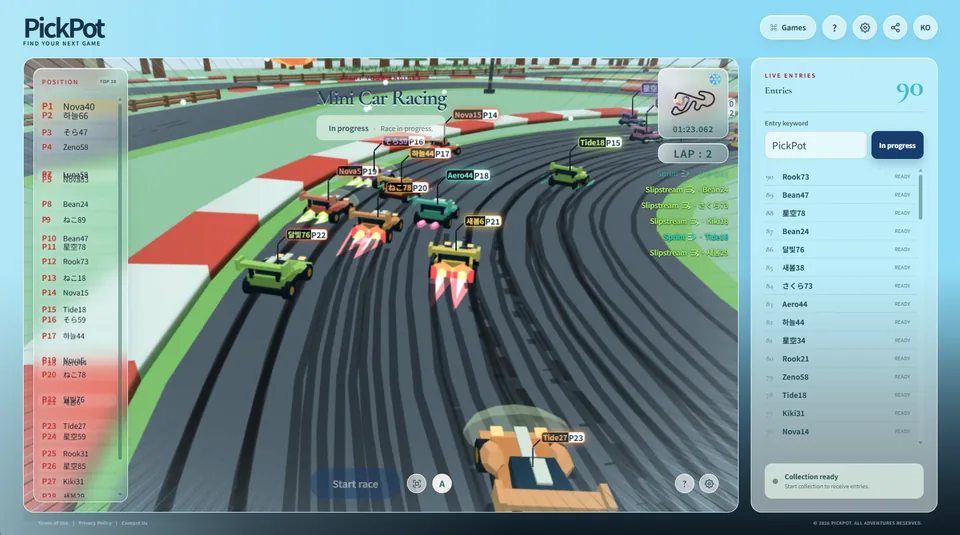
Turn collected chatters into racers, follow the track, and let weather, skills, and the final lap create a shared finish-line moment.
Watch your own mini car take the grid
Mini Car Racing lets viewers cheer for a car carrying their own name without learning complicated controls. As cars line up and the countdown begins, chat participants instantly become racers. A leader can struggle through a corner while another car closes the gap, turning every name on the standings into part of the story.
Hosts can call the lead battle like a sports broadcast and react naturally to surprise overtakes or retirements. A larger field gives more viewers someone to support across the track, making the race especially effective for community days, viewer events, or a featured mid-stream segment.
Mini Car Racing in play
Collect racers
Check the streaming platform and chat bridge in Settings, then collect racers with the race entry keyword. Each registered viewer receives a car and name label and appears in the participant list. The Start Race button activates once the minimum number of racers is available.
With many racers, expand the Position panel to review the current order and retired racers together.
Cars line up on the starting grid and the start sequence begins.
After the start, cars complete three laps while positions and lap information update live.
The first racer to finish three laps and cross the line wins.
After the award presentation, prepare the next race according to the game settings.
Using the race view
The Position panel shows the live order, while the minimap and lap display summarize progress. View Full Track moves to an overview of the circuit, and Automatic View follows key race action. Camera controls do not change positions or results.
Weather and race state
A race may use weather such as clear skies, rain, or snow. Weather changes the track atmosphere and presentation, and the current condition is visible in the game view. A new race environment is selected while preparing the next round.
If a car can no longer continue, it is marked as retired in the position list. The winner is determined by the finishing order of cars that complete the race.
Tips for a more exciting race
Before the start, briefly restate the field size and any prize or reward. Inviting chat to support a favorite racer just before the countdown creates energy before the cars even move. During the race, focus on clear stories—the leaders, a car climbing quickly, or a final-lap chase—rather than trying to describe every vehicle at once.
The game can be more than a single winner-takes-all race. Run a short league by collecting a new field each round, invite previous winners into a final, or continue immediately into another race with different weather. The same simple entry flow can support a much larger stream event.