Viewers request a weapon and an element in chat. The blacksmith forges six weapon types in order, imbues the successful ones, and enhances a personal item for each remaining viewer. The highest surviving enhancement wins.
Request a weapon in one chat message
During collection, choose an element and a weapon, then send them together in chat:
Choose an element: Water, Fire, Earth, Wind, Ice, Lightning, Poison, Light, or Dark.
Choose a weapon: Sword, Shield, Staff, Bow, Daggers, or Axe.
Type (element)(weapon name) with no space, for example "WindBow". English names are case-insensitive; Korean names also work.
Sending only one name or adding a space does not register a request. If the same viewer sends another valid request before collection closes, the latest request is used. The weapon names beneath the rack show the available choices; type the element and weapon names together in chat.
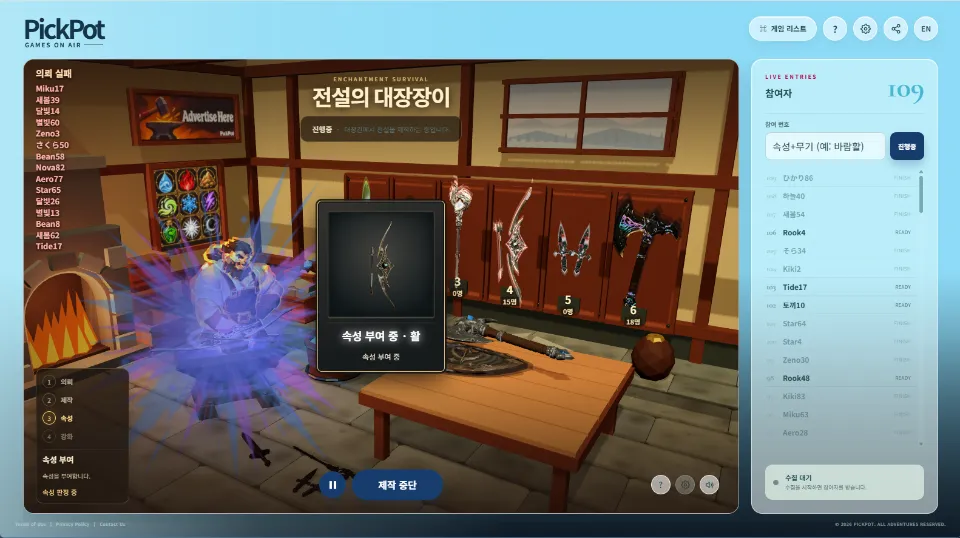
Actual game screen
1. Collect requests and start forging
The host checks the chat connection in Settings and begins collecting requests. Counts beneath the displayed weapons show how many viewers chose each type. When a collection time or entry limit ends, forging starts automatically if anyone joined; without a time limit, the host can press Start forging. New requests are closed once forging begins.
The blacksmith makes one weapon of each type in this order: Sword, Shield, Staff, Bow, Daggers, Axe. Each ingot must survive three strikes, gem setting, and a finishing strike. If a weapon fails at any step, everyone who requested that weapon type is eliminated. Successful items appear in an item card and then move to the table.
The forging result shows successful weapons and the survivor count. Select the people icon on a weapon card to see its surviving requesters. Press Next, or let the result countdown finish, to continue to elements.
3. Imbue an element
Each successfully forged weapon receives one attempt to gain an element. On success it randomly receives one of the nine elements. With fewer participants, requested elements receive an automatic selection boost. Only viewers whose requested weapon and element both match advance to personal enhancement. If imbuing fails, the weapon is destroyed and all its requesters are eliminated.
If a Bow receives Wind, viewers who requested WindBow survive; viewers who requested FireBow do not.
4. Personal enhancement and the winner
Each survivor gets up to ten strikes on a personal copy of their weapon. A success raises the enhancement level. A failure may leave it unchanged or lower it. An explosion destroys the item immediately and ends that viewer's remaining strikes. The list on the right shows the order and current results.
The highest enhancement among items that survive all ten strikes wins. If the leaders are tied, each tied viewer takes one extra strike. Tiebreak rounds repeat until one leader remains or their levels differ. If everyone is eliminated, the Blacksmith's Blessing selects one of the original requesters as the final winner.
Host settings and controls
Game Settings controls overall weapon completion, element imbuing, enhancement success, maximum rise and fall, presentation speed, and low-poly weapon display. Within enhancement successes, lower increases are more likely; explosion is part of the failure chance. Changes apply to the next forging run.
The host can pause and resume the active run. At the first two result screens, stop the automatic countdown or press Next. Enable Continue to next round to start another run with the same requests after completion; otherwise start a new round by collecting viewers again.